Per-device policy
Roles (user, readonly, admin or your own path rules), model allowlists like llama3.2,qwen3:*, and requests-per-minute limits.
Open source · MIT · single binary
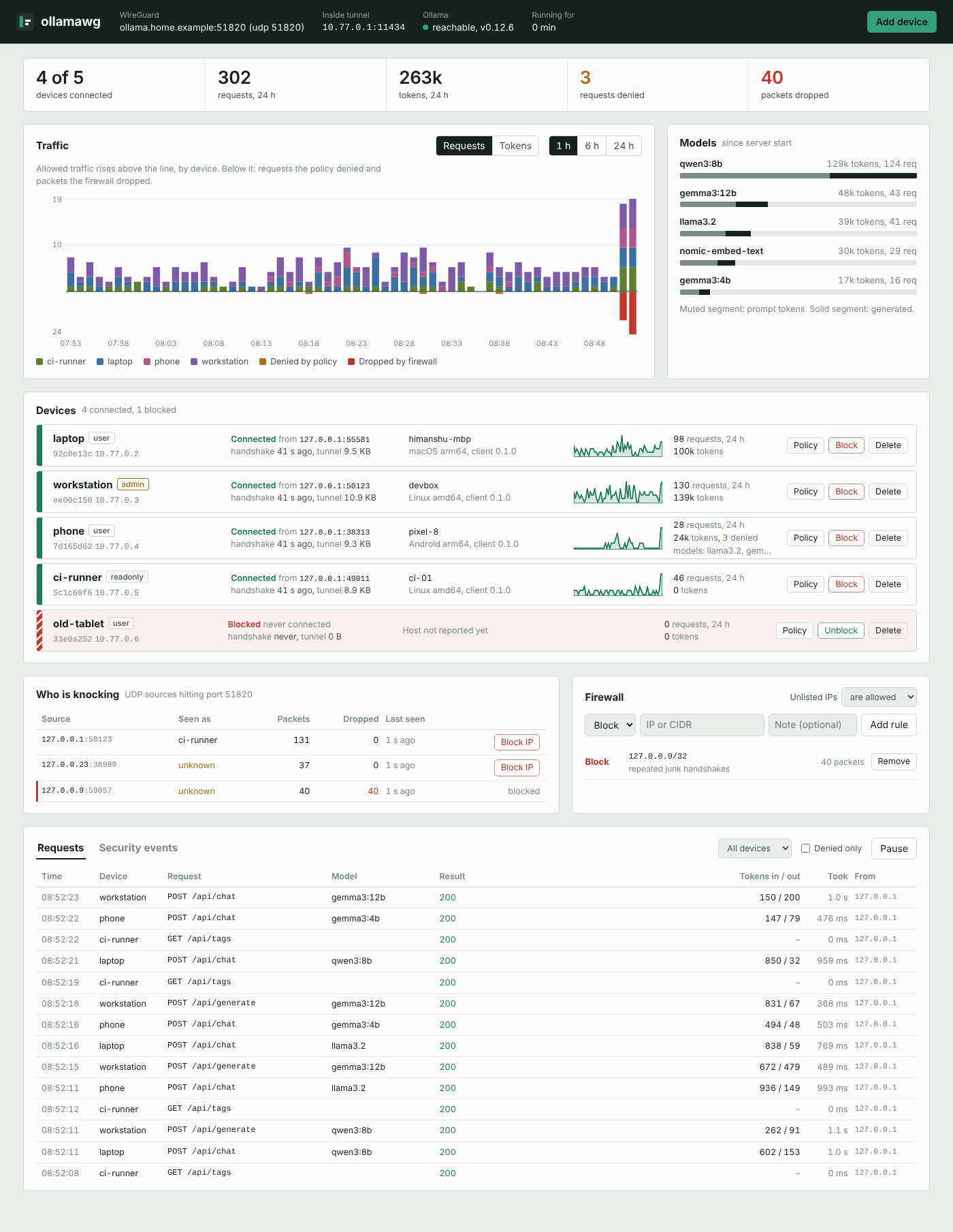
ollamawg puts an encrypted WireGuard tunnel in front of Ollama. It adds per-device access control, a dashboard that shows who is connected and what they run, and a ChatGPT-style chat page for phones. Ollama itself never leaves 127.0.0.1.
irm https://himanshu-mamgain.github.io/ollamawg/install.ps1 | iexcurl -fsSL https://himanshu-mamgain.github.io/ollamawg/install.sh | shnpm install -g @ollamawg/cligo install github.com/himanshu-mamgain/ollamawg/cmd/ollamawg@latestNo admin rights needed. Or download a binary from GitHub Releases. Not independently audited yet; see the security model.
Ollama has no authentication. If you set OLLAMA_HOST=0.0.0.0 and forward port 11434 so you can use your GPU box from elsewhere, anyone who finds the port can run your models, pull new ones and delete the ones you have. Scanners find these ports within hours.
Keep Ollama on loopback and open only a WireGuard port. WireGuard ignores every packet that isn't from a key you registered, so to the internet it looks closed. Inside the tunnel, ollamawg decides what each device may do and records what it did.
Every request passes three checks before it reaches Ollama.
ollamawg connect: apps use 127.0.0.1:1143410.77.0.1:11434/chat127.0.0.1:11434, unreachable from outsideWireGuard runs in user space (wireguard-go on gVisor's network stack), so the server needs no root, no kernel module and no TUN device. Keys are standard WireGuard keys, which is why the official phone apps work unchanged.
Roles (user, readonly, admin or your own path rules), model allowlists like llama3.2,qwen3:*, and requests-per-minute limits.
Block a device and its session is cut instantly. Block an IP or a whole network before it ever reaches WireGuard, or switch to default-deny.
Who is connected and from where, requests and tokens per device and model, policy denials, and every source knocking on the port. Prometheus metrics included.
Scan a QR code in the official WireGuard app. Only the server's tunnel address is routed, so the phone's other traffic is untouched.
A mobile-friendly chat at /chat: streaming replies, Markdown and code blocks, a model picker, history kept on the device, and Add to Home Screen.
Optionally protect the dashboard with Google Authenticator, Authy or 1Password. Choose your own username and password; it's stored as a bcrypt hash.
No public IP or port forwarding? Run ollamawg relay on a small cloud VM. Your server dials out to it and devices connect from anywhere. The relay can't read the traffic.
Adding, blocking or editing devices applies within 2 seconds without dropping anyone's session, whether from the CLI, the dashboard or a hand edit.
The ollama CLI, Open WebUI, LangChain, Continue and any OpenAI-compatible client work unchanged through the tunnel. It's also a Go library.
Pick one. All of them give you the same ollamawg command.
In PowerShell. Installs to %LOCALAPPDATA%\Programs\ollamawg and adds it to your PATH.
irm https://himanshu-mamgain.github.io/ollamawg/install.ps1 | iexInstalls to /usr/local/bin if writable, otherwise ~/.local/bin. Never uses sudo.
curl -fsSL https://himanshu-mamgain.github.io/ollamawg/install.sh | shPrebuilt binaries for each platform, no install scripts. Or run it once with npx @ollamawg/cli.
npm install -g @ollamawg/cliBuilds from source. Needs Go 1.24 or newer.
go install github.com/himanshu-mamgain/ollamawg/cmd/ollamawg@latestThe install scripts download from GitHub Releases and check each binary against the release's SHA256SUMS. Read them first if you like: install.sh, install.ps1. To pin a version, set OLLAMAWG_VERSION=0.4.0. Docker: ghcr.io/himanshu-mamgain/ollamawg (amd64 and arm64), see Docker.
You need Ollama on the server with at least one model (ollama pull llama3.2).
ollamawg init --endpoint your-public-ip-or-dns:51820This writes server.yaml with fresh keys and prints the dashboard login. On Windows it also lets devices through Windows Firewall (click Yes when asked). Forward UDP port 51820 on your router or cloud firewall to this machine.
ollamawg serveOpen the dashboard at http://127.0.0.1:8088 on the server, or over SSH with ssh -L 8088:127.0.0.1:8088 server.
ollamawg add-peer --name laptop        # on the server: writes laptop.yaml
ollamawg connect --config laptop.yaml  # on the laptop
curl http://127.0.0.1:11434/api/tags # any Ollama client now worksollamawg add-peer --name phone --qrScan the QR code in the WireGuard app, turn the tunnel on, and open http://10.77.0.1:11434/chat. Details below.
Phones don't need any ollamawg software. The server is a standard WireGuard peer, so the official app does the job.
ollamawg add-peer --name phone --qr, or use Add device → Phone in the dashboard.ollamawg.http://10.77.0.1:11434/chat. Use Share → Add to Home Screen to open it like an app.The chat page has no separate login: the phone's WireGuard key identifies it, and its role, model allowlist and rate limit apply. Chats stay in the phone's browser. Ollama apps such as Enchanted or Reins also work: point them at http://10.77.0.1:11434.
ollamawg reissue --name phone --qr, or press New config on the device in the dashboard. The device keeps its name, address and policy, and its old config stops working.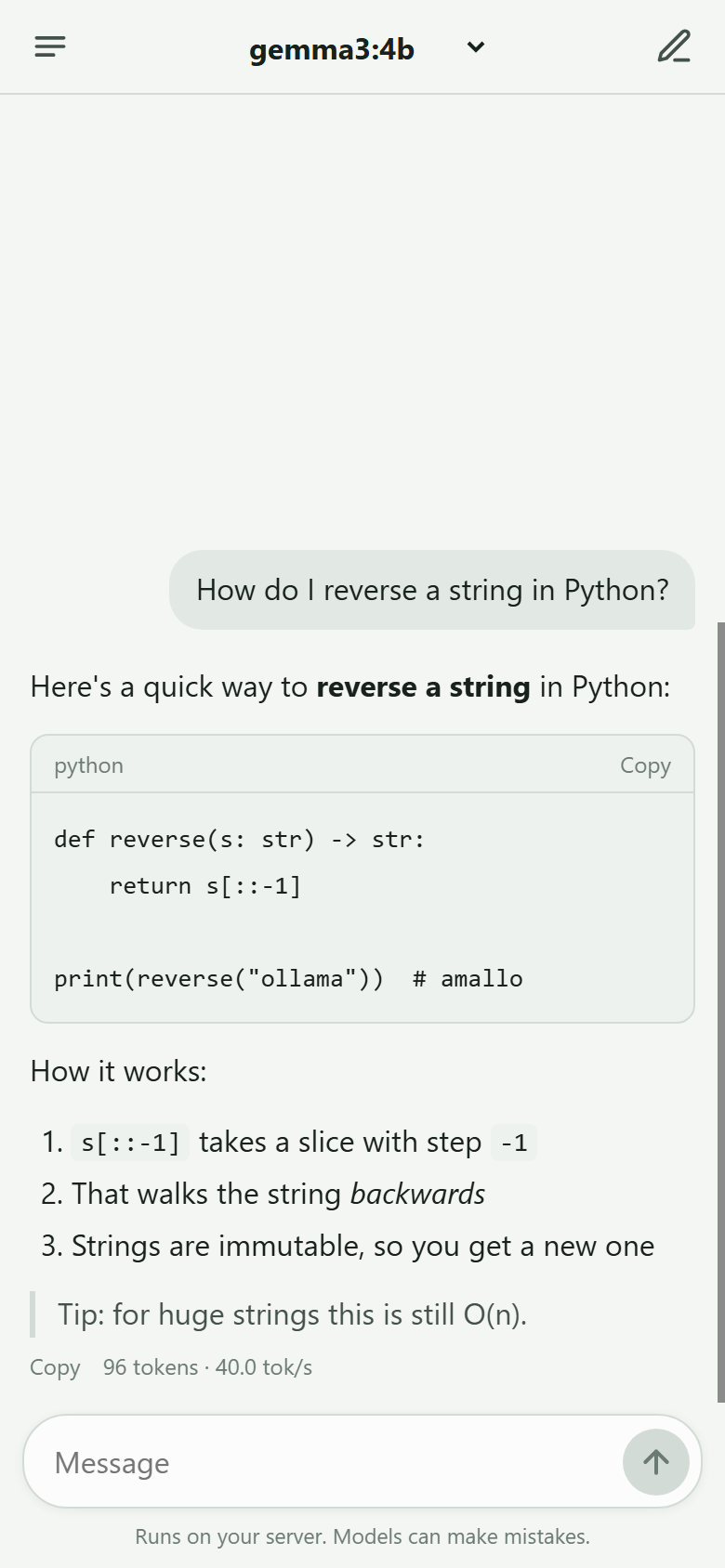
init creates the user admin with a random password. To choose your own, run the command below. A password you choose is stored only as a bcrypt hash.
ollamawg passwd                   # asks twice, hidden as you type
ollamawg passwd --user yourname # also change the usernameAdd a 6-digit code from an authenticator app. You can also use the 2FA button in the dashboard. Scripts and Prometheus then use an API token.
ollamawg 2fa enable    # scan the QR code, confirm a code
ollamawg 2fa disable # the way back in if you lose your phoneserver.yaml can't impersonate your devices.Full details: Security model.
127.0.0.1:11434 (its default).ollamawg connect. No admin rights needed.10. or 100.64–127. in that case. Run an ollamawg relay on any machine with a public IP, such as a free or $5 cloud VM. Your server dials out to it, so no port forwarding is needed. Relay guide · How to check for CGNAT.
| Command | Runs on | What it does |
|---|---|---|
init | server | Create server.yaml with keys and a dashboard login. |
serve | server | Run the tunnel, policy proxy, chat page and dashboard. |
add-peer | server | Register a device; --qr prints a QR code for the WireGuard app. |
reissue | server | New key and config (or QR code) for an existing device. |
remove-peer | server | Delete a device; its key can no longer connect. |
list-peers | server | Show devices and rules. |
block / unblock | server | Block a device (--device) or an IP or network (--ip). |
passwd | server | Set your own dashboard username and password. |
2fa | server | Enable, disable or check two-factor dashboard login. |
firewall | server | Let devices through the Windows Firewall (one permission prompt). |
relay | public VM / server | Run a relay (relay init, relay), or point the server at one (relay use), for servers behind CGNAT. |
connect | computer | Bring the tunnel up and expose Ollama on 127.0.0.1:11434. |
status | computer | Check the handshake and this device's policy. |
keygen / version | any | Print a WireGuard key pair / the version. |
Run ollamawg <command> -h for a command's flags.
Tailscale is great at connecting machines. ollamawg is about controlling an Ollama server you share, and it handles CGNAT with its own relay that you host. You get per-device roles, model allowlists, rate limits, token accounting, a request log and a built-in chat page, all self-hosted with no account or coordination server.
Yes. On a computer running ollamawg connect, everything that talks to Ollama on 127.0.0.1:11434 goes through the tunnel unchanged, including OpenAI-compatible clients pointed at http://127.0.0.1:11434/v1.
No, on the server or on computers. WireGuard runs in user space inside the ollamawg process. Phones use the WireGuard app, which asks once for VPN permission.
Run ollamawg reissue --name phone --qr, or press New config in the dashboard. The server never keeps device private keys, so it issues a fresh one; the old config stops working.
No. The chat page keeps history in the device's browser. The server's access log records metadata such as model and token counts, never prompts or replies.
The dashboard has one admin account. If several people need it, put a reverse proxy with SSO in front.
Not yet. Treat ollamawg as an evolving security tool, not an independently verified security product. The cryptography is wireguard-go and gVisor, which are widely deployed, and ollamawg's own code is small and tested end to end. The security model lists what it protects and what it doesn't.
Nothing. It's open source under the MIT license.
Install, set up a server, add laptops and phones, troubleshoot.
Every field in server.yaml and client configs, roles and model rules.
The UI, two-factor login, the admin API and Prometheus metrics.
What is protected, how, and what is not.
systemd, launchd, Windows, Docker and port forwarding.
Connect from anywhere when the server is behind CGNAT.
Embed the server or client in your own programs.